
ERP Software for Growing Businesses: The Scale-Up Selection Playbook
Quick Answer
ERP software for growing businesses should connect finance, inventory, sales, purchasing, production and operational data without creating unnecessary cost or complexity. The right ERP is not simply the cheapest system. It is the platform that fits current processes, supports future growth and avoids expensive replacement as transaction volumes, users, locations and operational requirements increase.
Growing companies often reach a difficult technology stage.
The accounting system still works.
Spreadsheets still work.
Individual departments may even have software that works reasonably well.
But the business as a whole stops working efficiently.
The problem is no longer whether individual applications work.
The problem is that the company has outgrown disconnected systems.
That is where selecting the right ERP software for growing businesses becomes a strategic decision.
However, replacing disconnected software with an oversized ERP creates another problem: excessive cost, unnecessary complexity and difficult adoption.
Growing companies therefore need a different approach:
- ✕ Not the cheapest ERP.
- ✕ Not the largest ERP.
- ✔ The right-fit ERP.
The ERP Decision Behind Business Growth
Business growth increases more than revenue.
It increases:
Processes that worked when a company was smaller can become operational bottlenecks.
Finance Reconciliation: A finance team may spend hours reconciling spreadsheets.
Warehouse Accuracy: Warehouse teams may struggle with real-time inventory accuracy.
Production Dependency: Production planning may depend heavily on individual employees.
Discrepant Numbers: Management may receive different numbers from sales, finance and operations.
The immediate temptation is to add another application.
But adding more disconnected applications can increase integration problems instead of solving them.
An ERP system creates value by connecting these processes through a common operational and financial data structure.
The decision, therefore, is not simply:
“Which ERP has more features?”
It is:
“Which ERP can support our required processes today without limiting our next stage of growth?”
Why Growing Businesses Outgrow Basic Systems
A growing company does not usually decide to implement ERP because its accounting software suddenly stops opening. The warning signs are operational.
Too Many Spreadsheets
Spreadsheets initially provide flexibility.
As operations expand, however, spreadsheets can become separate databases controlled by different employees.
Companies may have independent sheets for:
Production planning
Purchase requirements
Sales forecasts
Customer orders
Quality records
Expenses
Project costs
Management reporting
The organisation then spends increasing amounts of time updating, reconciling and validating information.
Limited Inventory Visibility
Growing inventory creates questions that basic systems may struggle to answer quickly:
- What is available now?
- What has already been committed?
- What is currently being purchased?
- Which warehouse holds the stock?
- Which items are slow-moving?
- Which materials are required for production?
- Which batches or serial numbers are affected?
Without integrated inventory information, companies may simultaneously experience excess inventory and stock shortages.
Department-Level Data Silos
Sales may use CRM.
Finance may use accounting software.
Operations may rely on spreadsheets.
Production may use another application.
Management then has information but not necessarily one reliable version of business performance.
ERP software can connect these functions so a transaction created in one process becomes available to relevant downstream processes.
Increasing Approval Complexity
Growth introduces additional controls.
- A purchase may require approval based on value.
- Discounts may require sales-manager authorization.
- Payments may require finance approval.
- Inventory movements may need warehouse controls.
Without structured workflows, approvals frequently move through email, messaging applications or verbal communication.
ERP workflows can establish defined authorization and accountability.
Reporting Takes Too Long
A major ERP trigger appears when management starts asking questions that the existing systems cannot answer quickly.
Examples include:
Growing companies need operational intelligence while decisions can still be changed—not weeks after the reporting period closes.
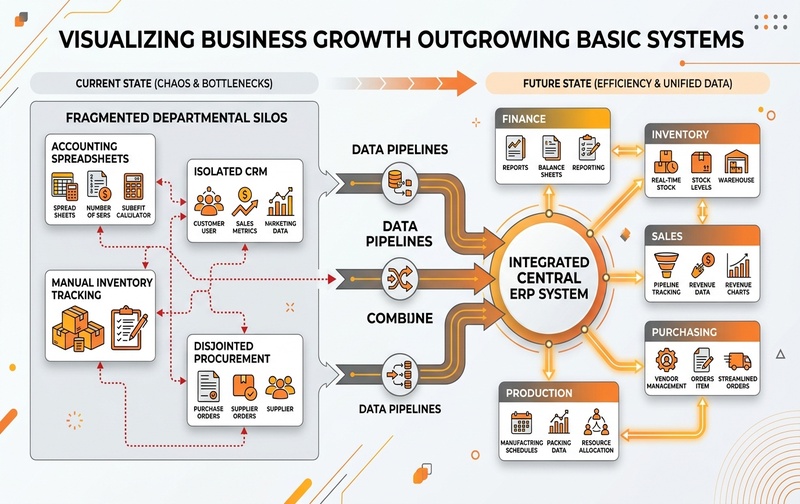
Figure 1: Architectural diagram showing how business growth creates disconnected departmental silos that transition into an integrated central ERP system uniting Finance, Inventory, Purchasing, and Production.
Affordable ERP Software: Price Versus Business Value
“Affordable ERP” is frequently misunderstood.
A low licence cost does not automatically produce a low-cost ERP project.
ERP cost should be evaluated through Total Cost of Ownership (TCO).
Total Cost of Ownership (TCO) Components
TCO can include:
A system with a low starting subscription can become expensive if extensive custom development is required.
Conversely, an ERP with a higher initial investment may deliver stronger long-term value if essential business processes are already supported.
Better ERP cost question:
Instead of asking:
“Which ERP is cheapest?”
Ask:
“What will this ERP cost us to implement, operate and scale over the next three to five years?”
That creates a much more realistic financial comparison.
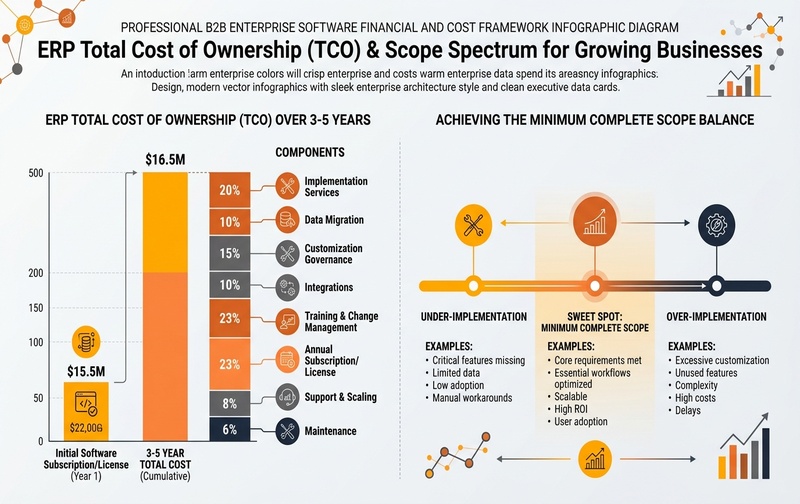
Figure 2: ERP 3-to-5 Year Total Cost of Ownership (TCO) Framework and the Minimum Complete Scope balance between under-implementation and over-implementation.
ERP Software Comparison for Growing Businesses
Growing companies commonly evaluate different categories of ERP platforms.
The following comparison is designed as a shortlisting framework, not as a universal ranking.
The correct choice depends more on process complexity than employee count alone.
Two companies with 150 employees can have dramatically different ERP requirements.
Professional Services (150 Employees)
A professional-services company may have relatively simple inventory requirements, focusing primarily on project billing, resource utilization, and general ledger accounting.
Pharmaceutical Manufacturer (150 Employees)
A pharmaceutical manufacturer with the exact same employee headcount requires rigorous compliance and deep operational control:
Quality processes
Production controls
Material traceability
Expiry management
Compliance documentation
ERP selection must therefore begin with business processes—not vendor names.
SAP Business One for Growing Businesses
SAP Business One is designed primarily for small and mid-sized organisations that require an integrated ERP environment.
It can bring together core functions such as:
Sales
Purchasing
Inventory
Business partner management
Production-related processes
Reporting
Warehouse operations
For growing organisations moving beyond entry-level accounting systems, its value comes from connecting operational transactions with financial information.
SAP Business One may warrant evaluation when:
- Inventory complexity is increasing
- Manufacturing processes need stronger control
- Multiple departments require common information
- Financial reporting needs greater visibility
- Purchasing and sales processes need integration
- The company needs structured approvals
- Business expansion is creating operational complexity
Implementation Partner Role: The implementation partner becomes particularly important because configuration, industry requirements, migration, integrations and process design influence the final system considerably.
Odoo for Growing Businesses
Odoo takes a modular application approach.
Businesses can adopt applications covering areas such as:
Sales
Accounting
Inventory
Purchasing
Manufacturing
Projects
HR
eCommerce
The modular structure can be attractive for organisations that want flexibility and phased adoption.
However, flexibility requires governance.
Growing companies should understand:
- Which modules are genuinely required?
- What must be customised?
- What can remain standard?
- Which integrations are needed?
- Who will maintain custom developments?
- How will upgrades affect modifications?
Customisation should solve genuine business requirements rather than recreate every legacy process inside the new ERP.
Microsoft Dynamics 365 Business Central for Growing Businesses
Microsoft Dynamics 365 Business Central is commonly evaluated by small and mid-sized companies seeking integrated finance and business-management capabilities.
Its position within the Microsoft ecosystem can be relevant for organisations already heavily using Microsoft technologies.
Evaluation areas should include:
As with every ERP, product familiarity should not replace process-fit analysis.
Oracle NetSuite for Growing Businesses
Oracle NetSuite is a cloud ERP platform commonly considered by growing organisations that need integrated financial and operational management.
Companies with multiple entities, expanding operations or a cloud-first technology strategy may include NetSuite in their ERP shortlist.
Key evaluation areas include:
A growing company should determine whether the platform’s capabilities match its actual operational requirements rather than choosing primarily because of brand recognition.
SAP S/4HANA Cloud for More Complex Growth
SAP S/4HANA Cloud addresses substantially broader enterprise requirements than typical entry-level ERP platforms.
It can become relevant when companies are dealing with:
However, choosing an enterprise-scale platform before the organisation needs that level of complexity can lead to over-implementation.
Growing businesses should assess whether the required process sophistication justifies the implementation scope.
The Minimum Complete ERP Scope
One of the most important ERP-selection principles is defining the minimum complete scope.
This means implementing enough functionality to create an integrated business process—but avoiding unnecessary complexity.
Under-implementation
A company may implement only finance and basic inventory even though production, procurement and warehouse operations are the real sources of business problems.
The result?
Important processes remain outside ERP, and spreadsheets continue.
Over-implementation
At the opposite extreme, companies may purchase advanced functionality they are not operationally ready to use.
The result can include:
- Higher implementation costs
- Longer projects
- More training
- Greater user resistance
- Unnecessary customisation
- Difficult system administration
Right implementation
The right scope sits between these extremes:
Current critical processes + near-term growth requirements + scalable architecture.
That is the minimum complete scope.
8 Factors for Choosing ERP Software for a Growing Company
1. Business Process Fit
Start with workflows.
Document:
➔
Quote
➔
Sales Order
➔
Delivery
➔
Invoice
➔
Collection
and, where relevant:
➔
Material Requirement
➔
Purchase
➔
Goods Receipt
➔
Production
➔
Quality
➔
Finished Goods
➔
Dispatch
Then identify where the current process breaks.
The ERP must solve these gaps.
2. Industry Requirements
Generic feature lists do not reveal industry fit.
- Bill of materials
- Production planning
- Material requirements
- Shop-floor visibility
- Quality control
- Multi-warehouse inventory
- Batch/serial tracking
- Pricing
- Order fulfilment
- Procurement
- Project costing
- Resource management
- Procurement against projects
- Billing
- Profitability tracking
Industry processes should influence the shortlist.
3. Scalability
Ask what happens when the business adds:
A new branch
Another warehouse
A manufacturing plant
Another legal entity
Higher transaction volumes
Another country
ERP should not only fit today’s organisation.
It should have a credible path for tomorrow’s organisation.
4. Integration
Identify systems that must exchange information with ERP.
Examples include:
Integrations should be considered during ERP selection—not discovered halfway through implementation.
5. Reporting and Analytics
ERP reporting should help executives answer operational questions quickly.
Evaluate whether decision-makers can access:
Gross margins
Cash position
Receivables
Payables
Inventory
Procurement
Production
Order status
Branch performance
A system is not truly integrated if management still needs multiple spreadsheets to understand the business.
6. Implementation Capability
ERP software is only one part of an ERP project.
The implementation team’s capability matters because it affects:
System configuration
Migration
Testing
Integration
Training
Go-live
Post-implementation support
For industry-heavy businesses, implementation experience can be as important as software functionality.
7. Total Cost of Ownership
Compare costs over several years.
Evaluate: Licensing + implementation + customisation + infrastructure + support + integrations + expansion costs.
This prevents an attractive initial price from hiding higher downstream costs.
8. User Adoption
ERP succeeds only when employees use it correctly.
An technically strong platform can still underperform when:
- Processes are unnecessarily complicated
- Users are poorly trained
- Roles are unclear
- Too many fields are mandatory
- Legacy workflows are reproduced without justification
ERP selection should therefore include usability and change-management considerations.
ERP Selection Scorecard for Decision-Makers
Before choosing an ERP, score every shortlisted system against the same business criteria.
This prevents ERP demonstrations from becoming feature presentations.
Instead, vendors must demonstrate how their software addresses your predefined requirements.
ERP Demo Checklist: What to Ask Vendors to Show
Do not ask for a generic product demonstration.
Give the ERP vendor scenarios from your actual business.
For example:
“Show us how a customer order moves from sales to inventory, procurement, delivery, invoicing and accounting.”
For manufacturing:
“Show us what happens from sales demand through material planning, purchasing, production, quality checks and finished-goods inventory.”
For finance:
“Show how management can analyse profitability, inventory value, receivables and cash exposure without exporting data into multiple spreadsheets.”
Also ask vendors to demonstrate:
A scenario-based demonstration exposes process gaps far faster than a generic product tour.
Common ERP Selection Mistakes Growing Companies Should Avoid
Choosing Only on Price
The cheapest proposal can become expensive when critical requirements require extensive modifications.
Compare TCO rather than only licence cost.
Selecting Based on Brand Recognition
A widely recognised ERP does not automatically fit every organisation.
Fit depends on process complexity, industry requirements, scalability and implementation capability.
Replicating Every Existing Process
ERP implementation is an opportunity to remove unnecessary manual steps.
Customising the system to reproduce inefficient legacy processes can eliminate much of the benefit.
Ignoring Future Requirements
An ERP that fits the company perfectly today but cannot support the next stage of growth may create another migration project.
Evaluate at least the likely next three to five years of business change.
Buying Too Much ERP
More functionality is not automatically better.
Unused enterprise functionality creates cost without delivering proportional business value.
Buying Too Little ERP
The opposite mistake is equally dangerous. If the system cannot support inventory, production, reporting or multi-location requirements, employees will return to spreadsheets.
The organisation then pays for ERP while continuing to operate outside ERP.
Cloud ERP or On-Premise ERP?
Cloud deployment continues to be attractive to growing companies because it can reduce the need to maintain extensive internal infrastructure.
However, deployment should still be evaluated against:
The correct deployment strategy depends on the organisation’s broader technology architecture.
Deployment should therefore be a selection criterion—not the entire ERP strategy.
When Should a Growing Business Implement ERP?
A company should consider ERP when operational complexity begins creating measurable business friction.
Common triggers include:
The strongest ERP business case usually appears when several of these issues occur together.
Which ERP Software Is Right for a Growing Business?
There is no single ERP platform that universally fits every growing company.
A better shortlist is based on business characteristics.
SAP Business One can be considered by growing small and mid-sized companies requiring integrated finance and operations with stronger inventory, distribution or manufacturing requirements.
Odoo can be evaluated by businesses prioritising modularity and configurable applications.
Microsoft Dynamics 365 Business Central can be relevant to small and mid-sized organisations looking for ERP capabilities within the broader Microsoft ecosystem.
Oracle NetSuite can be considered by cloud-oriented growing businesses, including organisations with multi-entity requirements.
SAP S/4HANA Cloud becomes more relevant as organisational and process complexity reaches enterprise scale.
The decision should ultimately be driven by:
➔
Industry fit
➔
Scalability
➔
Implementation complexity
➔
Total cost of ownership
Not simply by software popularity.
From ERP Comparison to ERP Business Case
ERP should not be purchased because the current software “feels old.”
Build a measurable business case.
Look for costs created by the current operating model:
Then define what the ERP project is expected to improve.
That converts ERP from an IT expenditure into an operational transformation initiative.
Frequently Asked Questions
What is the best ERP software for a growing business?
There is no universal best ERP. The right system depends on industry, process complexity, users, locations, manufacturing or inventory requirements, integrations, scalability and total cost of ownership.
What is affordable ERP software?
Affordable ERP is software whose overall implementation and long-term ownership cost is justified by the business value it delivers. Licence price alone does not determine affordability.
Is SAP Business One suitable for growing businesses?
SAP Business One is designed for small and mid-sized organisations and can support integrated finance, inventory, purchasing, sales and operational processes as business complexity increases.
Should a growing company choose cloud ERP?
Cloud ERP can reduce infrastructure requirements and simplify access, but the choice should also consider integrations, security, connectivity, data requirements and long-term cost.
When should a company move from accounting software to ERP?
ERP becomes relevant when disconnected systems, spreadsheets, inventory issues, manual processes and limited cross-department visibility begin restricting operational control and growth.
How should businesses compare ERP systems?
Compare systems using the same criteria: process fit, industry fit, functionality, scalability, integration, reporting, implementation capability, user adoption and three-to-five-year total cost of ownership.
Choose an ERP That Scales With Your Business
See how the right ERP can streamline operations and support your next stage of growth.
Book Your ERP Demo