
SAP ERP for Growing Businesses: Costs, Benefits, Deployment & Business Fit
Quick Answer: Is SAP ERP Suitable for Growing Businesses?
SAP ERP can be suitable for growing businesses when increasing operational complexity, disconnected systems, reporting limitations, integration requirements or multi-location operations make existing software difficult to manage. The right SAP solution, deployment model and implementation scope depend on business size, processes, users, industry requirements, integration needs and growth plans. The investment should therefore be evaluated on business fit and total implementation scope—not simply on software cost or the number of features available.
For a growing company, the more important question is not whether SAP is universally the “best” ERP. It is whether the selected SAP solution can address current process gaps while providing a practical foundation for future growth.
When Growing Businesses Start Outgrowing Their Existing Systems
Growth often exposes weaknesses that are difficult to see when a company is smaller.
A business may initially operate successfully with accounting software, spreadsheets, standalone inventory tools, CRM applications and manually maintained reports. As transaction volumes increase, however, employees may spend more time reconciling information between systems.
Common symptoms include:
• Finance and operational data residing in separate applications
• Manual consolidation of sales and inventory information
• Limited visibility into stock and purchasing
• Delayed management reporting
• Duplicate data entry
• Increasing dependence on spreadsheets
• Difficulties managing multiple branches or entities
• Disconnected customer, sales and finance information
• Manual approval processes
• Increasing integration requirements
These issues are not automatically solved by purchasing an ERP. The value comes from selecting a system and implementation approach that connects the processes creating the problem.
That is where SAP ERP can become relevant for a growing organization.
What SAP ERP Changes as a Business Scales
An integrated ERP environment can connect financial, operational and commercial processes through a common system rather than requiring teams to reconcile information manually.
Depending on the SAP solution selected, businesses can manage areas such as finance, sales, purchasing, inventory, production, supply chain, reporting and other operational requirements within an integrated environment.
For decision-makers, the potential value is less about having more software features and more about improving how business information moves across departments.
For example:
➔
integrated transaction and financial information
➔
structured procurement workflows
➔
centralized stock information
➔
more timely management information
➔
standardized processes that can support expansion
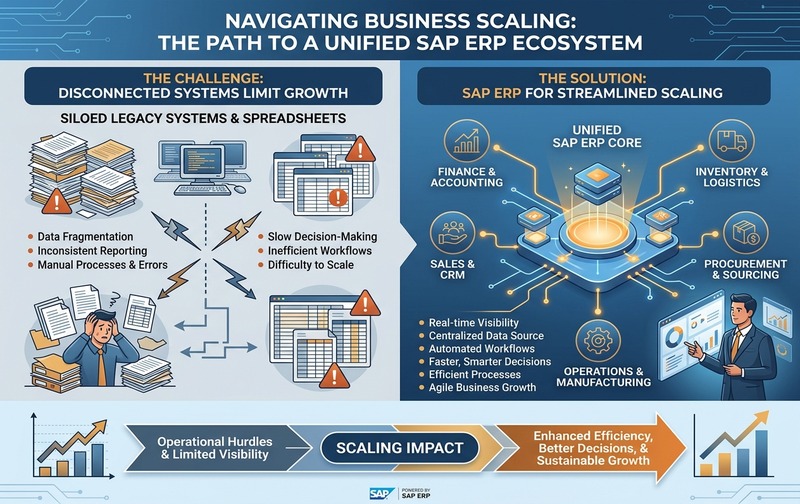
Enterprise B2B infographic illustrating business scaling challenges and SAP ERP integration for growing companies, comparing disconnected spreadsheets and siloed legacy systems with a unified SAP ERP ecosystem connecting finance, inventory, sales, procurement, and operations.
The exact capabilities depend on the SAP product, edition, deployment model, configuration and implementation scope. Those factors should be established before making an ERP investment decision.
SAP ERP Options for Different Business Growth Requirements
“SAP ERP” is not a single product that should be treated as identical for every organization.
The appropriate solution depends on the scale and complexity of the business.
Small & Mid-Sized Businesses
For small and mid-sized organizations, SAP Business One is particularly relevant because it is designed for the needs of smaller businesses while covering core areas such as financial management, sales, purchasing, inventory and operations.
Larger & Complex Enterprises
Larger or more complex organizations may have different requirements involving broader enterprise processes, multiple entities, advanced supply-chain requirements or more extensive integration landscapes.
This distinction matters because selecting an ERP based only on the SAP brand can lead to an inappropriate solution scope.
The evaluation should start with business requirements and then identify the SAP platform that fits them.
SAP ERP Benefits That Matter to Growing Businesses
The business case for SAP ERP should be based on measurable operational requirements rather than generic claims about digital transformation.
Integrated Business Information
When departments use disconnected systems, management may need to reconcile information before making decisions.
An integrated ERP environment can connect transactions across finance, sales, purchasing, inventory and other processes, creating a more consistent information flow.
Better Financial Control
Finance teams need visibility into transactions, receivables, payables, purchasing, inventory value and other financial information.
An integrated ERP can help establish structured processes and improve the connection between operational transactions and financial reporting.
Inventory and Supply Chain Visibility
Inventory becomes increasingly difficult to control as product ranges, warehouses, suppliers and transaction volumes expand.
ERP capabilities can provide centralized inventory information and support purchasing, stock movement and replenishment processes.
Process Standardization
Growth often creates different ways of completing the same process across departments or locations.
An ERP implementation can establish standardized workflows, approval structures and data practices.
Management Reporting
Senior decision-makers need timely information rather than manually consolidated spreadsheets.
An integrated ERP can provide structured reporting across financial and operational information, subject to the quality of the underlying data and implementation.
Scalability
The objective of scalability is not simply adding more users.
A scalable ERP should support increasing transaction volumes, organizational complexity, locations, processes and integration requirements without forcing the company to rebuild its entire information architecture.
SAP ERP Deployment Models: Cloud, On-Premise and Hybrid
Deployment affects cost, infrastructure responsibility, control, maintenance and scalability.
Cloud ERP
With a cloud deployment, the ERP environment is hosted within a cloud infrastructure and accessed through supported online services.
Potential advantages include:
- Reduced dependence on customer-owned infrastructure
- More predictable recurring costs
- Easier access for distributed teams
- Flexible scalability
- Simplified infrastructure management
However, cloud does not automatically mean lower total cost. Subscription, implementation, integration, customization, user requirements and ongoing services still need to be evaluated.
On-Premise ERP
An on-premise deployment places the ERP environment within infrastructure controlled by the organization or its designated hosting environment.
This may be relevant where the organization requires specific infrastructure control, integration architecture or internal IT policies.
The investment can include infrastructure, implementation, licensing, upgrades, maintenance, security and IT resources.
Hybrid ERP
A hybrid approach combines different environments or systems to address specific business and technical requirements.
It may be relevant when an organization has existing systems that cannot immediately be replaced or when different business units have different technology requirements.
The key consideration is not choosing the most popular deployment model. It is understanding which model aligns with the company’s security, integration, infrastructure, cost and operating requirements.
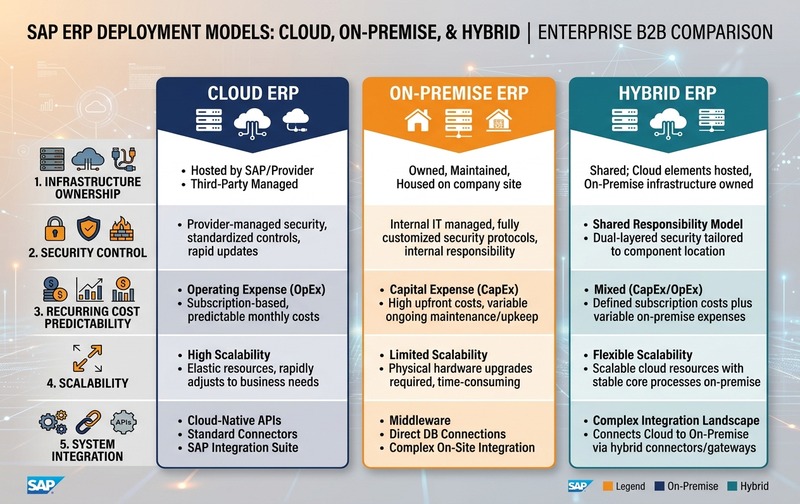
Professional B2B enterprise comparison diagram showing SAP ERP deployment models: Cloud ERP, On-Premise ERP, and Hybrid ERP, comparing infrastructure ownership, security control, recurring cost predictability, scalability, and system integration.
SAP ERP Cost: What Actually Drives the Investment?
There is no single SAP ERP implementation price that applies to every growing business.
The total investment can depend on several variables:
| Cost factor | What influences the investment |
|---|---|
| Software or subscription | Product, edition, licensing or subscription structure |
| Users | Number and type of users |
| Implementation | Scope, processes, configuration and project complexity |
| Customization | Requirements beyond standard functionality |
| Integration | Connections with CRM, payroll, ecommerce, banking or other systems |
| Data migration | Volume, quality and transformation requirements |
| Infrastructure | Hosting and infrastructure requirements |
| Training | Number of users and training scope |
| Support | Post-go-live support and maintenance requirements |
| Add-ons | Industry-specific or functional extensions |
Therefore, businesses should compare total cost of ownership and implementation scope, not just the software licence or subscription figure.
A lower initial price can become expensive if significant customization, integration or data-cleaning work is required later.
Similarly, a higher initial investment can be justified when the system directly addresses critical operational requirements.
What Makes SAP ERP Implementation Successful?
ERP software alone does not determine implementation success.
The implementation approach matters significantly.
A growing business should define:
Business requirements
Document the processes that need improvement before discussing customization.
Implementation scope
Clearly establish which modules, entities, locations, integrations and processes are included.
Data migration
Identify which historical and master data needs to move into the new system and validate its quality.
Integration requirements
Document systems that need to exchange information with the ERP.
User adoption
Employees need practical training and clear process ownership.
Customization governance
Customization should solve a genuine business requirement rather than reproduce every limitation of the old system inside the new ERP.
Post-go-live support
The organization should define how issues, optimization requirements and future changes will be managed after implementation.
SAP ERP Implementation Risks Growing Businesses Should Evaluate
ERP investment also carries risks.
⚠️ Unclear Requirements
If requirements are not documented properly, implementation scope can expand during the project.
⚠️ Excessive Customization
Heavy customization can increase cost, complexity and future maintenance requirements.
⚠️ Poor Data Quality
Migrating inaccurate or duplicated data can transfer existing problems into the new environment.
⚠️ Integration Complexity
ERP projects can become more complicated when multiple external applications must exchange data.
⚠️ Weak Change Management
Employees may continue using spreadsheets or manual processes when the new system requires different workflows.
⚠️ Underestimated Total Cost
Software cost is only one part of the investment.
⚠️ Inadequate Post-Go-Live Support
The ERP environment may require ongoing optimization as business processes evolve.
These risks do not mean SAP ERP is unsuitable. They show why the ERP decision should include implementation planning rather than focusing exclusively on product features.
SAP ERP Business Fit: When Does It Make Sense?
SAP ERP may warrant consideration when a growing business is experiencing several of the following conditions:
✓ Increasing transaction volumes
✓ Multiple departments using disconnected systems
✓ Complex inventory requirements
✓ Multiple warehouses or locations
✓ Increasing reporting requirements
✓ Need for stronger financial visibility
✓ Growing integration requirements
✓ Expansion into new markets
✓ Manufacturing or supply-chain complexity
✓ Increasing compliance requirements
✓ Difficulty controlling processes through spreadsheets
✓ Need for standardized workflows
The business should also evaluate whether the required functionality can be delivered through standard capabilities before committing to extensive customization.
SAP ERP vs Other ERP Options: What Should Decision-Makers Compare?
The right ERP decision should not be based on brand recognition alone.
When comparing SAP with other ERP platforms, evaluate the systems against the same criteria:
| Evaluation area | What to examine |
|---|---|
| Functional fit | Can the ERP support current and future processes? |
| Scalability | Can it support expected business growth? |
| Implementation | How complex is deployment for the organization? |
| Total cost | What are the software, implementation and ongoing costs? |
| Integration | Can it connect with existing applications? |
| Customization | How much modification is actually required? |
| Industry fit | Does it address industry-specific requirements? |
| Reporting | Can management obtain the required information? |
| Deployment | Does the hosting model fit IT requirements? |
| Support | What implementation and post-go-live support is available? |
This approach produces a more defensible ERP investment decision than simply asking which vendor is “best.”
How to Evaluate SAP ERP Before Making an Investment
A practical evaluation can follow six stages.
Identify Current Process Gaps
Document where the existing environment creates delays, duplication, errors or limited visibility.
Define Future Requirements
Separate immediate requirements from capabilities needed during the next stage of growth.
Select the Appropriate SAP Solution
Determine which SAP product and edition actually fit the business rather than assuming every SAP ERP product is interchangeable.
Compare Deployment Options
Assess cloud, on-premise or hybrid models based on infrastructure, security, integration and financial requirements.
Build the Full Investment Scope
Include software, implementation, migration, integration, customization, training and support.
Validate the Implementation Roadmap
Before committing, establish project phases, responsibilities, data requirements, integrations, user training and post-go-live support.
What Should CEOs, CFOs and CTOs Ask Before Choosing SAP ERP?
Senior decision-makers should ask:
- What business problems are we actually trying to solve?
- Which processes create the highest operational cost or risk today?
- Which SAP solution matches our current scale and future requirements?
- What will the complete implementation investment include?
- Which integrations are mandatory?
- How much customization is genuinely required?
- Which deployment model fits our IT and financial requirements?
- How will success be measured after go-live?
These questions move the discussion from software features toward business outcomes.
Conclusion: Evaluate SAP ERP Around Business Fit, Not Just Features
SAP ERP can provide a structured foundation for growing organizations that need greater process integration, financial control, operational visibility and scalability.
However, the right investment depends on more than choosing the SAP brand.
The business should evaluate the appropriate SAP solution, deployment model, implementation scope, integration requirements, data migration needs, customization level, total cost and long-term support requirements.
For a growing company, the objective should be to build an ERP environment that solves today’s operational problems without creating unnecessary complexity for tomorrow’s growth.
Frequently Asked Questions
Is SAP ERP suitable for growing businesses?
SAP ERP can be suitable for growing businesses that need integrated financial, operational and management processes. Suitability depends on business size, complexity, industry requirements, users, integrations, deployment preferences and future growth plans.
What are the main benefits of SAP ERP for growing businesses?
Key potential benefits include integrated business information, financial visibility, inventory management, standardized processes, management reporting, workflow control and support for increasing operational complexity.
How much does SAP ERP cost for a growing business?
SAP ERP cost varies according to the selected product, users, deployment model, implementation scope, integrations, customization, data migration, training and support. A complete investment assessment should include these factors rather than relying on a single software price.
What SAP deployment models are available?
Depending on the SAP solution, businesses may evaluate cloud, on-premise and hybrid approaches. The appropriate model depends on infrastructure, security, integration, control, scalability and financial requirements.
Is SAP Business One suitable for growing companies?
SAP Business One is designed for small and mid-sized businesses and can support core areas such as finance, sales, purchasing, inventory and operations. The appropriate solution should still be validated against the company’s specific requirements.
What affects SAP ERP implementation cost?
Implementation cost can be influenced by business processes, users, modules, locations, data migration, integrations, customization, reporting requirements, training and post-go-live support.
What are the biggest SAP ERP implementation risks?
Common risks include unclear requirements, excessive customization, poor data quality, complex integrations, insufficient user adoption, underestimated project scope and inadequate post-go-live support.
How should a business evaluate SAP ERP before investing?
Start by identifying current process gaps, define future requirements, select the appropriate SAP solution, compare deployment options, calculate the complete investment scope and validate the implementation roadmap with an experienced implementation team.
Book Your SAP ERP Demo
See how SAP ERP can address your operational challenges, improve visibility, and support business growth. Discuss your requirements with our team and explore the right SAP solution for your business.