


SAP Business One Add-ons for Manufacturing: Planning, Quality & Shop-Floor Control
Quick Answer
SAP Business One Add-ons for Manufacturing extend SAP Business One with additional capabilities for production planning, scheduling, quality control, WIP tracking, and shop-floor operations. Manufacturers may need these capabilities when production becomes too complex for manual coordination, spreadsheets, disconnected quality records, or delayed shop-floor reporting. The right manufacturing add-on can help connect production plans with material availability, quality inspections, work-order progress, and operational data. However, requirements differ significantly between discrete, process, batch, make-to-order, and mixed-mode manufacturers. The right solution should therefore be selected according to the company’s actual production processes, control requirements, integration needs, and operational complexity.
Where Manufacturing Operations Start Losing Control
Manufacturing operations rarely lose control because of one isolated problem.
The difficulty usually begins when production volume, product complexity, customer requirements, material dependencies, or quality controls increase faster than the systems supporting them.
A production team may create the weekly plan inside the ERP, but planners still maintain spreadsheets to calculate priorities.
Material availability may exist in SAP Business One, but planners may have limited visibility into whether the required materials will actually be available when a production order reaches the machine.
Production supervisors may know what is happening on the shop floor, while management receives the information several hours—or even days—later.
Common warning signs include:
- Production planning delays
- Frequent schedule changes
- Material shortages discovered after production is planned
- Capacity constraints identified too late
- Manual production updates
- Limited visibility into work in progress
- Quality inspection information maintained separately
- Delayed production confirmations
- Spreadsheet-based scheduling
- Repeated data entry between systems
- Limited machine or resource visibility
- Delayed reporting from the shop floor
Individually, each problem may appear manageable.
Together, they can create significant operational consequences.
Production schedules become unreliable. Materials may be purchased too early or too late. Production orders remain open without clear status. Quality issues may not be visible until finished goods inspection. Inventory figures may differ from actual shop-floor consumption.
Management then spends more time asking:
What is actually happening in production right now?
The objective of manufacturing-focused SAP Business One functionality is not simply to add more screens or reports.
It is to improve the flow of operational information between planning, production, materials, quality, and management.
SAP Business One Add-ons for Manufacturing Planning
Production planning becomes increasingly difficult when planners must simultaneously consider demand, inventory, materials, machine capacity, labor availability, priorities, and delivery commitments.
Standardized ERP transactions may provide the core production structure, while a manufacturing add-on can provide additional planning depth where the operation requires it.

Enterprise infographic detailing SAP Business One manufacturing planning add-on capabilities including production scheduling, capacity planning, material availability MRP, resource allocation, and shop-floor sequencing.
Production Planning
Manufacturers need to determine:
- What should be produced?
- How much should be produced?
- When should production begin?
- Which orders should receive priority?
- Which resources are required?
Additional production planning functionality can help planners convert demand into a more structured production plan.
Instead of coordinating production using separate spreadsheets, planning information can remain closer to the SAP Business One manufacturing environment.
Production Scheduling
Creating production orders is different from scheduling them efficiently.
A production order may be valid while still competing with multiple other orders for the same machine, labor group, tool, or production line.
Manufacturing add-ons may provide scheduling capabilities that help planners sequence jobs according to factors such as:
- Required completion dates
- Production priorities
- Available resources
- Machine capacity
- Material availability
- Setup requirements
- Existing workloads
This can help production teams identify scheduling conflicts before they become shop-floor delays.
Material Planning
A production schedule is only executable when the required materials are available.
Additional planning functionality may combine demand, inventory, purchasing, production requirements, and lead times to provide greater visibility into future shortages.
For example:
Production requirement: 5,000 units scheduled next week
Material requirement: Component A required for all 5,000 units
Current availability: Material sufficient for only 3,200 units
Identifying this gap during planning gives procurement and production teams more time to respond.
Discovering it after the production order reaches the shop floor creates disruption.
Capacity Planning
Material availability alone does not determine whether a production plan is feasible.
A manufacturer may have every component required but still lack enough machine hours or labor capacity to complete production on schedule.
Capacity planning functionality can help evaluate:
- Machine availability
- Work-center capacity
- Labor capacity
- Planned workloads
- Available production hours
- Competing orders
This helps planners distinguish between a theoretically possible plan and an operationally achievable one.
Resource Allocation
Certain jobs may require specific:
- Machines
- Operators
- Tools
- Production lines
- Work centers
Additional manufacturing functionality can provide greater control over how these resources are assigned and scheduled.
Production Priorities
Priority changes are common in manufacturing.
A major customer may request an urgent order. A machine may stop unexpectedly. Materials may arrive late. A high-priority batch may require immediate production.
The challenge is ensuring that schedule changes are visible throughout production rather than being communicated through calls, messages, and spreadsheets.
WIP Planning
Planners should also understand what is already moving through production.
Without reliable WIP visibility, new schedules can be created without considering unfinished jobs occupying machines, materials, or labor.
Better WIP planning helps connect future production requirements with current shop-floor conditions.
Bottleneck Identification
A production line does not operate at the speed of its fastest process.
It is constrained by the resources creating the greatest capacity limitation.
Manufacturing planning functionality can help identify bottlenecks such as:
- Overloaded machines
- Limited work centers
- Insufficient labor availability
- Long production operations
- Material-dependent delays
Earlier bottleneck visibility enables production managers to adjust the schedule before customer delivery commitments are affected.
SAP Business One Quality Management Add-ons for Manufacturing
Quality management should not operate as an isolated activity after production is complete.
Quality controls may need to exist from the moment materials arrive until finished products are released.
Manufacturing-focused SAP Business One add-ons can support structured quality processes depending on the requirements of the organization.
Incoming Inspection
Raw materials, components, and purchased goods may require inspection before they become available for production.
Quality functionality can support inspection against defined parameters such as:
- Dimensions
- Weight
- Chemical properties
- Visual standards
- Supplier specifications
- Technical tolerances
Instead of recording results separately, inspection information can remain connected with the relevant material or purchasing transaction.
In-Process Inspection
Some manufacturers cannot wait until production is complete to identify quality problems.
Inspections may need to occur:
- Between production stages
- At defined operation points
- At specific intervals
- After machine setup
- After process changes
In-process inspections help identify deviations before additional material, labor, and machine time are invested.
Final Inspection
Finished products may require final approval before they can be:
- Transferred to inventory
- Packed
- Shipped
- Released to customers
Structured final inspection helps ensure that product acceptance follows defined criteria rather than informal approval.
Quality Parameters
Different products may require different inspection criteria.
Manufacturing quality functionality can allow organizations to define parameters, tolerances, specifications, and acceptance criteria according to the product or process.
Rejection Tracking
A rejection should answer more than:
How many units failed?
Manufacturers often need visibility into:
- What was rejected
- When the rejection occurred
- Where it occurred
- Which production order was affected
- What defect was identified
- What quantity was rejected
- What action followed
This information supports both operational control and continuous improvement.
Non-Conformance Tracking
Recurring quality problems can remain hidden when information exists across emails, spreadsheets, inspection sheets, and production records.
Centralized non-conformance tracking can provide better visibility into recurring defects and their operational impact.
Corrective Actions
Where required, quality processes can also support corrective action workflows.
This may include:
- Recording the non-conformance
- Identifying the probable cause
- Assigning responsibility
- Defining corrective actions
- Monitoring completion
- Reviewing the outcome
Batch and Lot Traceability
For industries where batch or lot traceability is critical, quality information should ideally remain linked with the relevant batch, lot, material, supplier, or production order.
This is particularly important for industries such as:
- Pharmaceuticals
- Food and beverage
- Chemicals
- Medical equipment
- Automotive components
- Electronics
Connected traceability can make investigations significantly more efficient when quality issues occur.
Quality Documentation
Inspection records, certificates, test results, approvals, rejection details, and corrective actions may also form part of the organization’s quality documentation requirements.
The objective is to make quality information easier to retrieve, analyze, and connect with actual production activity.
SAP Business One Shop-Floor Control Add-ons for Real-Time Production Visibility
Production planning tells the organization what should happen.
Shop-floor control tells management what is actually happening.
That distinction becomes critical when production schedules change throughout the day.
Manufacturing add-ons can provide additional shop-floor capabilities for capturing and monitoring production execution.
Production Progress
Managers need visibility into whether production orders are:
- Not started
- In progress
- Delayed
- Partially completed
- Completed
Real-time or near-real-time progress visibility makes it easier to identify orders moving outside the planned schedule.
Work-Order Status
Instead of relying on supervisors to manually prepare status reports, operational information can be captured against individual work orders or production orders.
Management can then examine production according to:
- Customer order
- Product
- Production line
- Work center
- Machine
- Shift
- Production order
Material Consumption
Actual material consumption may differ from planned consumption.
Without timely recording, SAP inventory can show materials that have already been used physically on the production floor.
Shop-floor functionality can help capture material consumption closer to the point where it occurs.
This improves both inventory accuracy and production costing visibility.
WIP Tracking
Work in progress represents production that has consumed resources but has not yet become finished inventory.
Poor WIP visibility makes it difficult to answer basic operational questions such as:
- Where is the order?
- Which operation is pending?
- How much has been completed?
- What remains?
- Why is the order delayed?
Improved WIP tracking provides production managers with a clearer view of unfinished production.
Operator Activities
Where required, manufacturers may capture operator-related production information such as:
- Job start
- Job completion
- Work duration
- Quantity produced
- Scrap
- Production operation
The required level of tracking depends heavily on the manufacturer’s processes.
Machine and Resource Activities
Production visibility may also include:
- Machine status
- Machine workload
- Resource utilization
- Operational availability
- Production time
This can help planners compare planned capacity with actual production conditions.
Production Confirmations
Delayed confirmations create delayed ERP information.
If production completion is entered several hours after the work is physically finished, management is effectively making decisions using outdated information.
Capturing production confirmation closer to the actual event reduces this information gap.
Downtime
Unplanned downtime can affect production schedules, delivery dates, resource utilization, and overall output.
Tracking downtime by machine, resource, reason, or duration can help production managers identify recurring operational problems.
Output Monitoring
Managers may need to compare:
Planned output vs. actual output
at multiple levels:
- Shift
- Machine
- Production line
- Product
- Work center
- Production order
This helps identify production deviations earlier.
Real-Time Production Information
The strategic value of shop-floor control is not simply data collection.
It is shortening the time between an event happening and management becoming aware of it.
When information arrives sooner, managers have more opportunity to correct the deviation.
Planning, Quality and Shop-Floor Control — Why They Need to Work Together
Manufacturing performance cannot be optimized when planning, production execution, and quality management operate as separate information systems.
A more connected manufacturing flow looks like:
Planning → Production → Quality → Shop-Floor Data → Management Visibility
Each stage provides information required by the next.
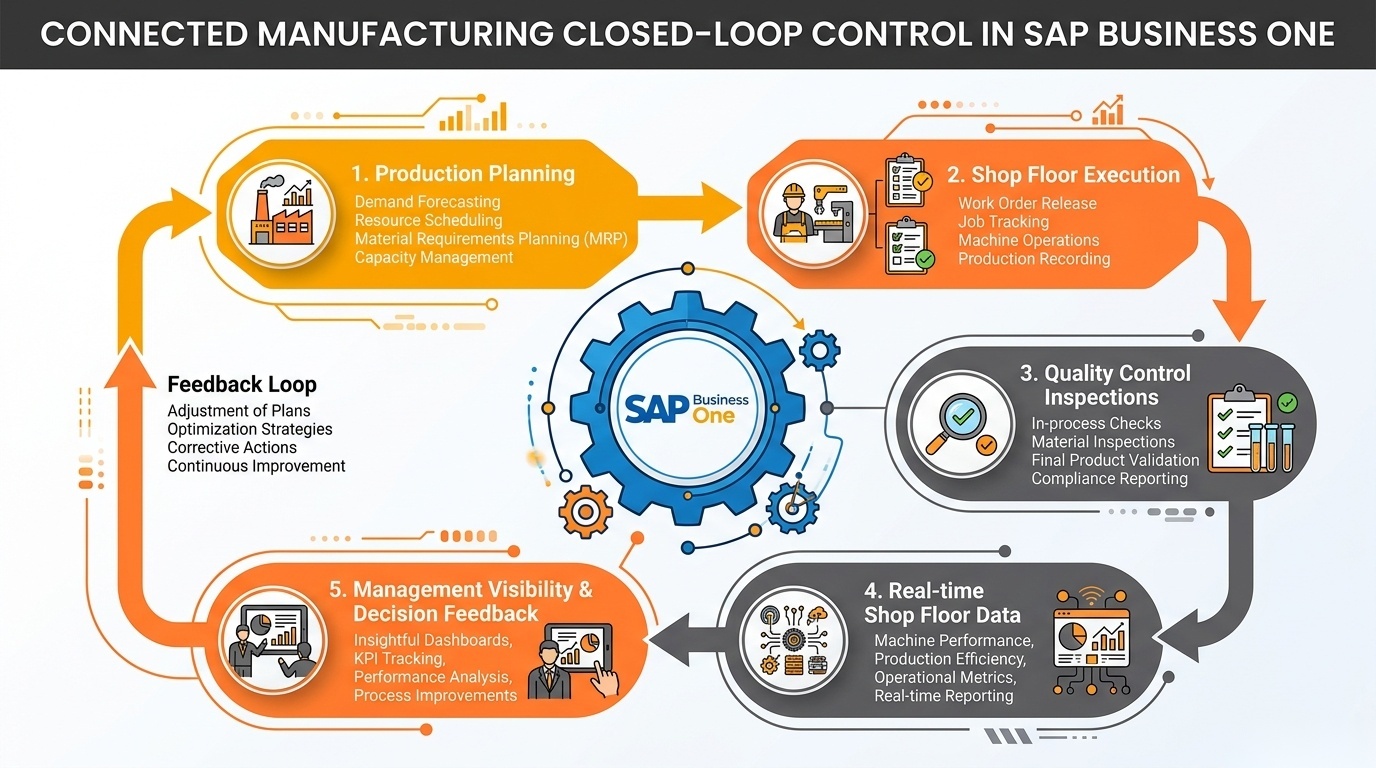
Enterprise workflow diagram showing closed-loop integration between production planning, shop-floor execution, quality control inspections, real-time shop-floor data, and management decision feedback in SAP Business One.
Consider a simple production scenario.
Planning schedules an order for 10,000 units.
Production starts the order.
During production, a quality inspection identifies abnormal rejection levels.
The shop-floor team records the issue.
Management sees that actual output will fall below the planned quantity.
Planning can then adjust future production or reschedule another order.
When these processes are disconnected, the same situation may work very differently.
Quality records the problem separately.
Production continues.
The ERP still reflects the original production plan.
Planning assumes 10,000 units will be available.
Sales commits delivery based on that assumption.
Only later does management discover that actual output is significantly lower.
Disconnected manufacturing information can therefore create:
- Delayed decision-making
- Production inefficiencies
- Quality problems
- Inventory inaccuracies
- Incorrect production assumptions
- Schedule disruption
- Reporting inconsistencies
- Poor customer delivery visibility
Connecting planning, quality, and shop-floor information within the SAP Business One environment creates a stronger operational feedback loop.
The plan influences production.
Actual production updates the system.
Quality results influence production decisions.
Shop-floor data updates management visibility.
Management then has better information for the next planning cycle.
Manufacturing Problems SAP Business One Add-ons Can Help Solve
Not every SAP Business One manufacturing add-on provides the same functionality.
The correct evaluation should therefore begin with the operational problem rather than assuming a particular product will provide every capability.
| Operational Problem | Add-on Solution | Business Impact |
|---|---|---|
| Production Planning Depends on Spreadsheets | Integrated production planning and scheduling functionality connected with SAP Business One data. | Better production visibility, fewer disconnected planning files, and reduced manual coordination. |
| Planners Discover Material Shortages Too Late | Material planning functionality that evaluates production requirements against inventory, purchasing, and expected availability. | Earlier shortage visibility and better coordination between production and procurement. |
| Production Orders Compete for the Same Resources | Capacity and resource planning that considers machine or work-center availability. | More realistic production schedules and earlier identification of capacity constraints. |
| Management Cannot See Current WIP | Shop-floor and WIP tracking linked with production orders and operations. | Better visibility into where production is currently located and which orders are delayed. |
| Quality Results Are Maintained Outside SAP Business One | Integrated quality inspection and non-conformance functionality. | Better traceability between materials, production activity, inspection results, and quality issues. |
| Production Updates Reach ERP Too Late | Shop-floor production confirmation functionality. | Faster availability of production data for inventory, planning, and management reporting. |
| Material Consumption Does Not Match ERP Inventory | Structured shop-floor consumption reporting connected with production. | More accurate inventory information and stronger production-cost visibility. |
| Managers Receive Production Reports Only at the End of the Shift | Production dashboards and operational reporting connected with shop-floor activity. | Earlier identification of delays, output gaps, and production deviations. |
| Repeated Data Entry Creates Errors | Integration between planning, production, quality, inventory, and shop-floor processes. | Reduced duplication, fewer data inconsistencies, and more reliable management information. |
When Should a Manufacturer Consider an SAP Business One Add-on?
An add-on should not be implemented simply because additional functionality exists.
Manufacturers should consider additional functionality when operational complexity begins creating persistent control gaps.
Several warning signs can indicate that further manufacturing capability should be evaluated.
Spreadsheet Usage Keeps Increasing
Occasional spreadsheets are normal.
The risk begins when spreadsheets become the actual production planning system while SAP Business One becomes only the transaction-recording system.
Production Reporting Is Mostly Manual
If supervisors spend significant time collecting production updates before management can understand actual output, reporting processes may need improvement.
Production Plans Change Frequently
Frequent replanning is not necessarily a problem.
The issue arises when planners cannot evaluate the consequences of those changes quickly enough.
WIP Is Difficult to Track
If teams repeatedly need to call the shop floor to determine where an order is located, existing system visibility may be insufficient.
Quality Information Exists Separately
Quality records maintained outside the core ERP environment can make traceability and analysis more difficult.
Production Updates Are Delayed
Delayed production confirmation means planning, inventory, sales, and management may all work with outdated information.
Multiple Systems Perform Related Manufacturing Tasks
Disconnected planning, quality, shop-floor, inventory, and reporting systems increase integration and data consistency requirements.
Employees Re-enter the Same Information
Repeated manual entry creates both administrative workload and data-quality risk.
Production Performance Is Difficult to Measure
If management cannot easily compare planned and actual production performance, additional reporting or shop-floor functionality may be justified.
A manufacturer should evaluate an add-on when these problems materially affect productivity, visibility, delivery performance, quality, inventory accuracy, or management control.
How to Choose the Right SAP Business One Manufacturing Add-on
Manufacturers should avoid beginning the selection process with a vendor presentation.
Begin with the manufacturing process.
The guiding principle should be:
Identify the process problem first. Select the add-on second.
1. Manufacturing Process Requirements
Map the actual production process.
Determine whether the operation is:
- Make-to-stock
- Make-to-order
- Engineer-to-order
- Batch manufacturing
- Process manufacturing
- Discrete manufacturing
- Repetitive manufacturing
- Mixed mode
The required functionality can vary substantially between these models.
2. Production Complexity
Evaluate:
- Number of production stages
- BOM complexity
- Routing complexity
- Number of machines
- Number of work centers
- Production locations
- Shift structures
- Subcontract operations
- Batch requirements
Greater complexity usually requires deeper planning and execution controls.
3. Planning Requirements
Determine whether the organization requires capabilities such as:
- Detailed scheduling
- Capacity planning
- Finite planning
- Production sequencing
- Material planning
- Priority management
- Resource planning
Do not purchase functionality that the planning team will not realistically use.
4. Quality Requirements
Assess where inspections occur:
- Incoming materials
- Production stages
- Finished goods
- Supplier quality
- Customer returns
Also determine whether the organization needs non-conformance, corrective action, quality documentation, or batch traceability.
5. Shop-Floor Requirements
Define what information must come directly from production.
Examples include:
- Job start and stop
- Production quantity
- Scrap quantity
- Material usage
- Labor time
- Machine time
- Downtime
- Work-order progress
6. SAP Business One Integration
The add-on should fit cleanly into the SAP Business One environment.
Evaluate how information moves between the add-on and:
- Inventory
- Purchasing
- Sales
- Production
- Financials
- Warehousing
- Batch or serial management
Poor integration can simply replace one disconnected system with another.
7. Reporting and Analytics
Determine which manufacturing KPIs decision-makers actually need.
Examples may include:
- Plan vs. actual output
- WIP
- Scrap
- Rejection
- Production lead time
- Resource utilization
- Downtime
- Production cost
- Schedule adherence
8. Scalability
The selected solution should accommodate expected increases in:
- Production volume
- Users
- Plants
- Warehouses
- Products
- Machines
- Quality requirements
9. User Adoption
A technically strong solution can still fail if production users find it difficult to operate.
Shop-floor interfaces in particular should support fast, practical transaction entry.
10. Implementation Requirements
Understand the implementation effort before selection.
Evaluate:
- Process mapping
- Configuration
- Integration
- Testing
- Training
- Data preparation
- Go-live support
11. Customization Requirements
Determine whether a requirement genuinely needs customization or whether the underlying process can follow standard functionality.
Heavy customization can increase future support and upgrade complexity.
12. Support and Maintenance
Manufacturing systems are operational systems.
Evaluate:
- Support availability
- Upgrade compatibility
- SAP Business One version compatibility
- Issue-resolution process
- Long-term maintenance
- Product roadmap
The best manufacturing add-on is therefore not necessarily the one with the largest feature list.
It is the solution that best fits the manufacturer’s operational requirements while maintaining manageable integration, implementation, adoption, and support.
What to Check Before Implementing a Manufacturing Add-on
Selecting the solution is only one part of the project.
Implementation readiness should be assessed before configuration begins.
Existing SAP Business One Configuration
Review how SAP Business One is currently configured for:
- Production
- Inventory
- Purchasing
- Warehousing
- BOMs
- Resources
- Batch and serial management
Existing configuration issues should be addressed before additional functionality is layered on top.
Master Data
Manufacturing functionality depends heavily on master-data quality.
Review:
- Item masters
- BOMs
- Routings
- Resources
- Warehouses
- Production parameters
- Units of measure
- Batch and serial structures
Poor master data can produce poor planning results regardless of the quality of the add-on.
Production Processes
Document what actually happens on the shop floor, not only what the official process document says should happen.
This helps identify practical exceptions and operational requirements.
User Roles
Define who will:
- Create plans
- Change schedules
- Release production
- Record consumption
- Confirm production
- Perform inspections
- Approve quality results
- Review reports
Integration Requirements
Identify any systems that must exchange data with SAP Business One or the manufacturing solution.
Examples may include:
- Machines
- Barcode systems
- MES systems
- Warehouse systems
- Quality instruments
- External applications
Existing Customizations
Existing SAP Business One customizations should be reviewed carefully to identify potential conflicts.
Data Migration
If existing manufacturing data resides in spreadsheets or legacy applications, determine what information needs to be migrated.
Avoid migrating poor-quality historical data without a clear business purpose.
Testing
Testing should include realistic manufacturing scenarios rather than only basic transaction tests.
Test situations such as:
- Material shortage
- Partial production
- Rejection
- Rework
- Schedule changes
- Machine downtime
- Excess consumption
- Production cancellation
Training
Training should reflect actual user responsibilities.
A production operator, planner, quality manager, and ERP administrator should not receive identical training.
Reporting
Finalize key operational reports before go-live.
Management should know where critical production information will come from once the system is active.
Post-Implementation Support
Manufacturing operations will continue after go-live.
Define:
- Support responsibilities
- Escalation processes
- Issue priorities
- Optimization reviews
- Change-management procedures
A proper manufacturing process assessment before implementation reduces the risk of automating an inefficient process.
See How SAP Business One Add-ons Can Improve Your Manufacturing Operations
Your manufacturing operation may not need more software.
It may need better control over specific process gaps.
We can help evaluate where additional SAP Business One manufacturing capabilities may improve your existing environment across:
- Production planning and scheduling
- Capacity and resource planning
- Quality control
- WIP visibility
- Shop-floor management
- Material consumption and tracking
- Production reporting
- Process automation
- SAP Business One integration
- Manufacturing analytics
Instead of beginning with a generic add-on demonstration, the discussion can focus on how your production process currently operates, where information is delayed or disconnected, and which capabilities may address those gaps.
Frequently Asked Questions
See SAP Business One Add-ons in Action
Discover how the right SAP Business One capabilities can improve production planning, quality, WIP visibility, and shop-floor control.
Explore relevant workflows, add-on options, and integration requirements based on your actual manufacturing processes.
Fill out the form below to explore your manufacturing requirements.