

SAP Business One for Pharmaceutical Industry: Choosing Between Standard ERP and Pharma-Specific Solutions
Quick Answer
SAP Business One can support pharmaceutical distributors and selected manufacturers when its configured purchasing, inventory, batch management, sales, finance, and production capabilities match their operational requirements. Businesses needing advanced quality management, electronic batch records, enforced release workflows, or jurisdiction-specific regulatory controls should evaluate SAP Business One with suitable extensions alongside specialized pharmaceutical ERP platforms.
The right choice depends on documented requirements and tested workflows, not whether a vendor labels its software “pharma-ready.” A distributor focused on batch-level stock and expiry visibility may need a different architecture from a manufacturer managing complex production, deviation investigations, and controlled batch release.
This guide compares three approaches, explains where their boundaries lie, and provides a practical selection framework for CEOs, CTOs, operations leaders, and quality teams.
Pharmaceutical ERP Choices at a Glance
| Business situation | Approach to evaluate first | Main decision test |
|---|---|---|
| Distribution with manageable batch, expiry, purchasing, and sales requirements | Standard SAP Business One | Can it trace received and delivered batches and meet required stock controls? |
| Manufacturing or distribution needing additional quality or warehouse controls | SAP Business One with pharma-specific add-ons or integrations | Are inspection, release, genealogy, and exception workflows enforced end to end? |
| Complex manufacturing with extensive electronic records or specialist regulatory workflows | Specialized pharmaceutical ERP, evaluated against an enhanced SAP Business One solution | Which architecture meets mandatory requirements with acceptable risk and total cost? |
*These are evaluation starting points, not automatic product recommendations. Capabilities vary by implementation, product version, module, and add-on.*
The Operational Gaps That Drive Pharmaceutical ERP Decisions
Pharmaceutical businesses handle more than routine inventory transactions. A product’s journey may involve supplier batch identification, incoming inspection, controlled storage, production consumption, finished-goods testing, release authorization, transfers, and customer delivery.
When these steps are disconnected, teams may face:
- Slow recall investigations: staff must reconcile purchasing, warehouse, production, and dispatch records.
- Expiry-related write-offs: products remain unnoticed or cannot meet customer minimum shelf-life terms.
- Quality-release delays: stock status and approval evidence are unclear or maintained outside the system.
- Unreliable operating data: inventory movements and production records cannot be reconciled quickly.
- Audit preparation effort: required documents, changes, and decisions are scattered across files and applications.
For example, a distributor receives a complaint about one medicine batch. A workable ERP process should reveal remaining stock by location and relevant customer deliveries without relying on ad hoc spreadsheets. For a manufacturer, the investigation may additionally require the raw-material lots and production records connected to that finished batch.
The purchasing decision begins by mapping these real workflows. A software feature list cannot show whether control is actually maintained at each handoff.
What Standard SAP Business One Can Do for Pharma
SAP Business One provides core ERP processes across purchasing, sales, inventory, financial management, and production-related workflows. SAP documentation also describes batch management and associated records such as quantities, expiration dates, and batch transactions.
Depending on setup and business process, pharmaceutical teams can use the core platform to establish a stronger record of:
- Supplier purchases, receipts, and inventory transactions
- Batch-managed items and recorded expiry information
- Warehouse stock and customer sales documents
- Bills of materials, production orders, and material issues where appropriate
- Financial reporting linked with operational transactions
Where Core Functionality Needs Closer Examination
A batch field is not equivalent to a validated pharmaceutical quality system. Standard batch tracking does not, by itself, prove that an implementation supports electronic batch records, complete raw-material-to-finished-product genealogy, authorized quality release, serialization, or every applicable audit-trail and electronic-signature requirement.
Ask the vendor to distinguish standard product functionality, configuration, third-party extensions, and custom development. Each has different implications for testing, upgrades, support ownership, and ongoing cost.
SAP Business One With Pharma Add-Ons vs Specialized Pharmaceutical ERP
An enhanced SAP Business One deployment can preserve a common business and finance platform while adding purpose-built functions through supported extensions or integrated applications. Depending on the selected product, these may address quality inspection, warehouse allocation, advanced traceability, documentation, or release processes.
A specialized pharmaceutical ERP may offer industry-oriented processes in a more integrated package. That can be valuable where electronic batch documentation, deviations, controlled records, and specialist manufacturing processes dominate daily work. However, “pharma-specific” does not guarantee suitable workflows, compliant records, or a simpler implementation.
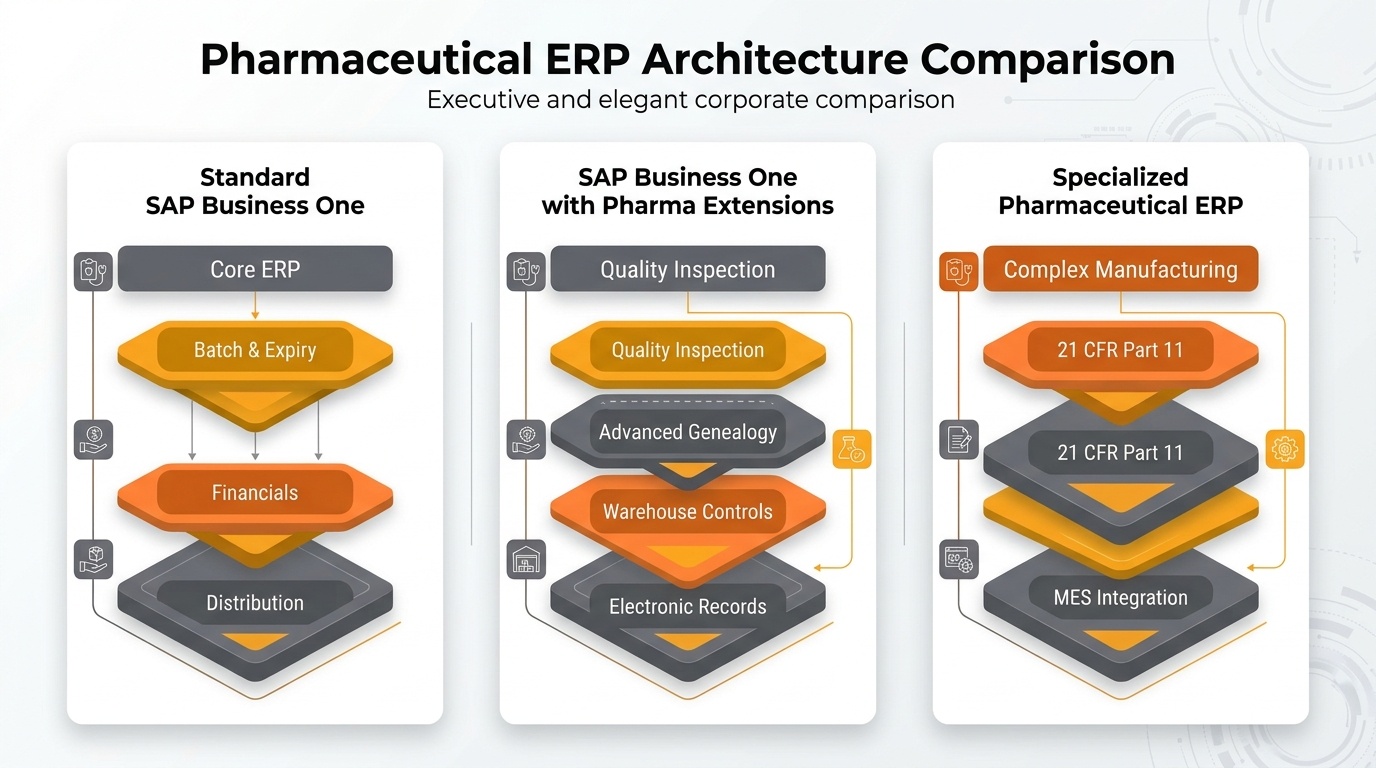
Enterprise comparison infographic illustrating Standard SAP Business One, SAP Business One with pharma add-ons, and specialized pharma ERP architecture across batch tracking, quality release, compliance, and validation.
| Capability to evaluate | Standard SAP Business One | SAP Business One plus extensions | Specialized pharma ERP |
|---|---|---|---|
| Batch and expiry details | Documented core batch features; verify process fit | May extend alerts and allocation logic | May provide deeper industry workflows |
| FEFO and blocked-stock enforcement | Test actual picking and restriction behavior | May provide advanced allocation and quality holds | Test built-in controls and exceptions |
| Production and genealogy | Verify production records and trace-back needs | May add more detailed genealogy | May provide industry-focused production records |
| Quality inspection and batch release | Do not assume full controlled release | May add inspection and approval workflows | Verify control depth and evidence |
| Electronic records and signatures | Assess applicable gaps | Assess controls across each application | Assess scope and validation evidence |
| Ownership and upgrades | Core implementation and customization costs | Add vendor, integration, and compatibility costs | Assess licensing, migration, and specialist support |
Decision principle: Shortlist the solution that proves mandatory controls in a scripted demonstration and can be maintained economically—not the one with the longest feature list.
Four Pharma Workflows Every ERP Demonstration Should Pass
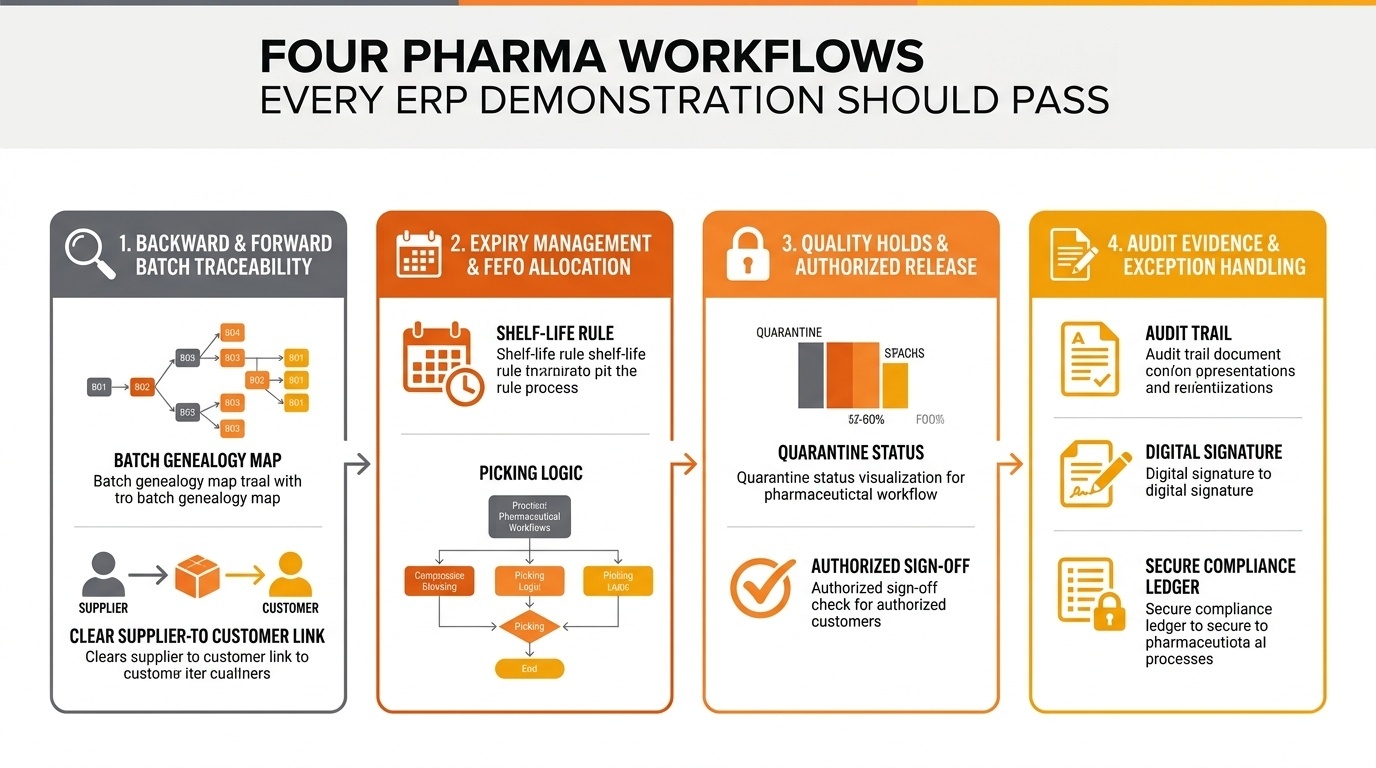
Enterprise infographic showing the four essential pharmaceutical ERP demonstration workflows including end-to-end batch traceability, FEFO expiry management, quality holds with authorized release, and regulatory audit evidence.
1. Backward and Forward Batch Traceability
Run a mock complaint against a chosen finished-product or received batch. Ask the system to identify the relevant supplier batches, production consumption where applicable, quantities on hand, warehouse movements, and customers supplied.
For manufacturers, distinguish lot tracking from full batch genealogy. For distributors, test tracing received stock through transfers and sales. Verify the completeness and speed of record retrieval against written acceptance criteria.
2. Expiry Management and FEFO Allocation
FEFO (First Expired, First Out) prioritizes eligible stock with the nearest expiry date; FIFO (First In, First Out) prioritizes stock received earliest. An expiry-date field alone does not prove FEFO is enforced in allocation or picking.
Test two batches with different expiry dates, minimum customer shelf-life requirements, partial quantities, and warehouse transfers. Confirm what users see and whether the system prevents inappropriate selection when that control is mandatory.
3. Quality Holds and Authorized Batch Release
Create a receipt awaiting inspection. Attempt to reserve, pick, transfer, issue, or sell stock before authorized release. The vendor should show precisely where blocked status applies, who can authorize release, and how the decision is documented.
A warning report is not necessarily an enforced operational restriction. Identify any manual procedures or additional quality-management system dependencies.
4. Audit Evidence and Exception Handling
Ask for the record of who performed a relevant transaction, who changed controlled data, which approval was applied, and whether historical records remain retrievable. Test rejected transactions, correction procedures, user access restrictions, and integration outages—not just successful workflows.
These four tests expose critical gaps faster than a broad demonstration of generic ERP screens.
Pharmaceutical ERP Compliance and System Validation
ERP suitability is determined by a pharmaceutical organization’s intended use, jurisdiction, regulated activities, and documented controls. Software procurement does not itself establish GMP compliance.
Depending on their regulatory scope, organizations may need to assess GMP/GDP expectations, computer-system validation or assurance, electronic records and signatures, data integrity, audit trails, retention, access control, and change management. For organizations subject to US FDA rules, 21 CFR Part 11 may apply to particular electronic records and signatures; for relevant EU GMP operations, Annex 11 addresses computerized systems. These frameworks should not be applied indiscriminately to every company or record.
A joint IT, quality, and business review should establish:
- Which regulated records and approvals the system will maintain
- Required user roles, segregation of duties, and access restrictions
- Data integrity, backup, restoration, retention, and retrieval controls
- Change history, audit trails, and applicable signature requirements
- Test evidence, supplier responsibilities, and change-control procedures
- Integration boundaries, particularly between ERP, QMS, WMS, MES, and other systems
Where validation is required, create evidence appropriate to intended use and risk. Obtain guidance from qualified quality and regulatory professionals. Neither SAP Business One nor a specialized ERP should be described as universally “GMP compliant” without reference to the configured and tested implementation.
ERP Selection Framework for CEOs, CTOs, and Quality Leaders
A structured selection process avoids both underbuying critical controls and overbuying specialist functionality.
Step 1 — Map the current process. Document purchasing, inspection, manufacturing, warehousing, release, returns, and distribution. Identify spreadsheet dependencies and approval handoffs.
Step 2 — Classify requirements. Separate legally or operationally mandatory controls from important improvements and optional conveniences. Quality leaders should confirm the applicable obligations.
Step 3 — Build a fit-gap matrix. Evaluate standard SAP Business One, SAP Business One plus named extensions, and specialized ERP against the same test cases. Mark each item as native, configured, extended, custom-built, manual, or unsupported.
Step 4 — Conduct scenario-based demonstrations. Use representative batches, exception cases, expiry restrictions, and actual roles. Ask vendors to show evidence generated by the complete process.
Step 5 — Validate the implementation architecture. Confirm integration ownership, master data governance, upgrade paths, backup arrangements, and support responsibilities across multiple vendors.
Step 6 — Compare total cost and deployment risk. Include licensing, implementation, data migration, extensions, integration, training, required validation work, maintenance, and internal staffing.
Step 7 — Define acceptance criteria. Record the test result, gap owner, remediation plan, and sign-off decision before committing to go-live.
Sample Fit-Gap Scorecard
| Requirement | Business criticality | Evidence to request | Result |
|---|---|---|---|
| End-to-end batch trace | Mandatory where required | Completed mock recall | Pass / Gap |
| Quarantine and authorized release | Based on regulated process | Blocked-stock and approval test | Pass / Gap |
| Expiry restrictions | Based on product/channel | FEFO and shelf-life scenario | Pass / Gap |
| Electronic record controls | Jurisdiction-specific | Record, access, and audit demonstration | Pass / Gap |
| Integration resilience | Based on architecture | Failed-interface and recovery test | Pass / Gap |
Do not offset a failed mandatory control with high scores for convenience features. Resolve disqualifying gaps before comparing weighted totals.
Cost, Scalability, and Measurable ROI
The least expensive initial license is not necessarily the lowest-risk solution. Total cost of ownership also includes services, migration, quality and regulatory testing, integrations, maintenance, upgrades, change management, and ongoing internal administration.
Build the business case around measurable baselines:
| Business measure | Baseline to capture | Potential improvement to evaluate |
|---|---|---|
| Expiry-related losses | Annual write-offs | Better visibility and stock rotation |
| Recall readiness | Time to identify affected stock/customers | Faster, repeatable record retrieval |
| Inventory accuracy | Physical-to-system variance | More reliable transaction discipline |
| Audit effort | Hours spent collecting evidence | Easier record retrieval |
| Release turnaround | Time from inspection to authorization | Fewer manual handoffs |
Estimate benefits only after testing workflows and setting realistic adoption assumptions. Business-process redesign, staff training, and reliable master data often determine whether the expected gains materialize.
Plan for expansion into additional warehouses, product lines, entities, manufacturing stages, or jurisdictions. A solution that meets today’s requirements may still become costly if every new quality workflow requires another disconnected customization.
The Right ERP Path for Each Pharmaceutical Operating Model
Pharmaceutical distributors: Start with standard SAP Business One if purchasing, sales, inventory, batch-level transactions, and expiry visibility represent the core need. Test recall reporting, customer shelf-life requirements, and stock restrictions before deciding that standard functionality is sufficient.
Pharmaceutical manufacturers with moderate complexity: Compare SAP Business One with appropriate quality and manufacturing extensions against specialist products. Prioritize material genealogy, production records, inspection evidence, release authorization, and integration support.
Complex or highly regulated manufacturers: Evaluate specialized pharmaceutical ERP or a broader architecture when mandatory manufacturing, electronic-record, and quality workflows cannot be met reliably or cost-effectively through a proposed SAP Business One implementation.
The final recommendation should document demonstrated controls, unresolved gaps, accountable vendors, regulatory assessment, lifecycle cost, and the rationale for the selected approach.
Frequently Asked Questions About SAP Business One for Pharma
Find the Right ERP Fit for Your Pharmaceutical Business
Evaluate how SAP Business One compares with pharma-specific ERP solutions to meet your operational, batch tracking, expiry management, and compliance requirements.
Request a Pharmaceutical ERP Demo